




Refreshed design and experience
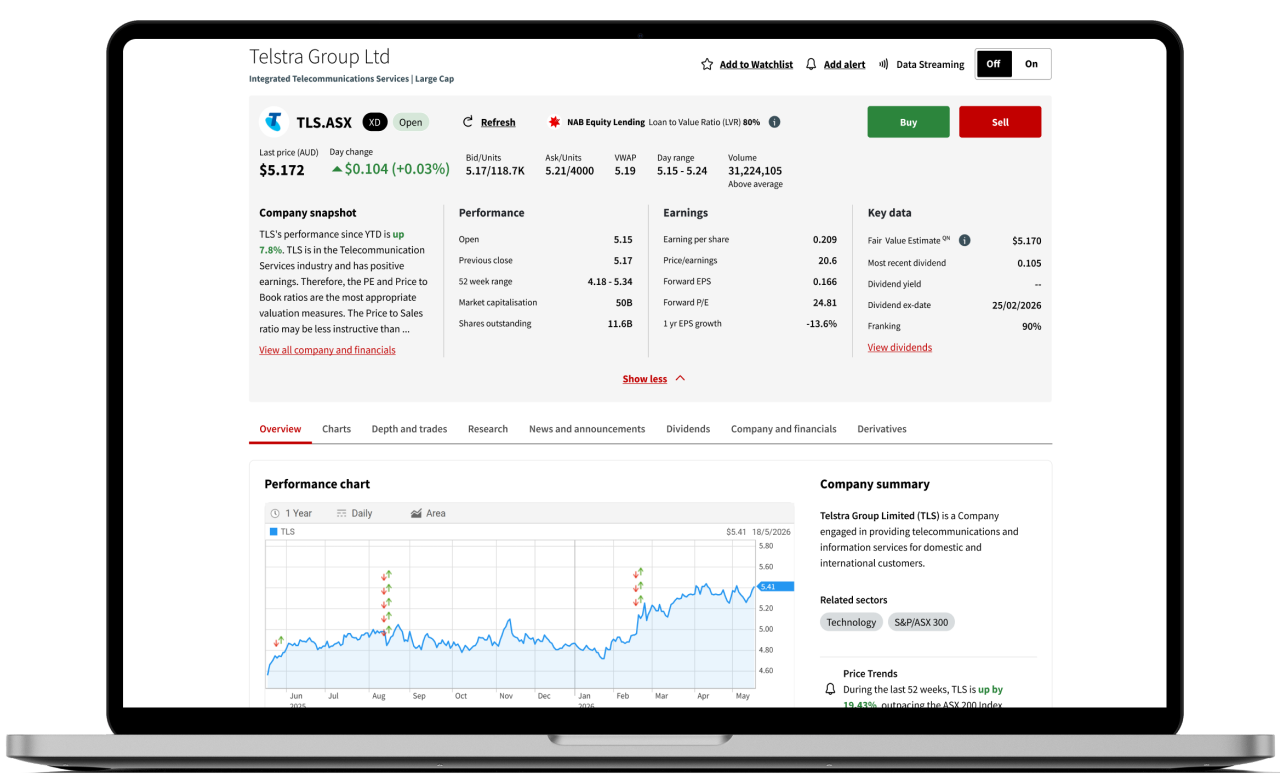
The company page has a refreshed look and feel, including simplified charting and data that provides a clear overview of company performance, financials and research.
Improved usability
Easily navigate between tabs to find out more about a company’s performance, including earnings forecasts and trends, as well as financial information.

Research partners
We have partnered with a number of leading global research providers to help you make more informed investment decisions.
Company page
Here you can access a quick and easy snapshot of information about a company including performance and volume information. The company page is split into eight tabs:
- Overview
- Chart
- Depth and trades
- Research
- News and announcements
- Dividends
- Company and financials
- Derivatives
- Overview
- Chart
- Depth and trades
- Research
- News and announcements
- Dividends
- Company and financials
- Derivatives
Overview
Here you can access a quick and easy snapshot of information about a company including performance and volume information. Under the overview tab you can see:
- Company summary
- NAB Equity Lending information
- Performance chart with Price Sensitive Announcements
- Key events
- Performance summary
- Data on trades, market depth and market detail
- Research snapshot
- Similar investments snapshot
Chart
The charting tab provides access to charting tools including:
- Stock and index comparison functionality
- The ability to overlay key announcements and compare performance
- Events including dividends, share splits and price sensitive announcements
Depth
The depth tab provides access to market depth and trades information. Click on a row to see volume ahead information, and if your trading accounts have open buy or sell order/s, you'll see them highlighted in the Market Depth table. This will indicate where your order is and at what price.
Research
We have partnered with a number of leading global research providers to help you learn more about your potential investment. Each provider utilises different methodologies, allowing you to view potential investments through multiple lenses. When used independently or combined, these lenses can help you make more informed investment decisions.
Research is broken up into five categories:
- Overview – Provides a general overview of the company as assessed by our global research partners.
- Consensus – Rates a stock by relying on the wisdom of the crowd.
- Technical – Leverages market data to identify trends and make predictions about the future price movements of a stock.
- Quantitative – Considers factors which are measurable in numerical terms (e.g. P/E ratio).
- Qualitative – Considers factors which are based on the character or quality of the variables (e.g. Management).
News and announcements
Keep up-to-date with the latest news and announcements to help give you a better chance of acting quickly to take advantage of opportunities or avoid losses. Under the news and announcements tab you will see the recent headlines for a stock. Simply select either the ASX announcements or News button to view the desired information.
Dividends
Under the dividends tab, by default you will see dividends for the last 12 months. You can use the filter to view historic results.
Buying stocks for their dividends is a strategy that can be appealing to investors looking to generate income or to build wealth by reinvesting dividends.
Projected dividends are available under Company and financials > Profile.
Company and financials
Here you can access a quick and easy snapshot of company information including performance and volume information. The company and financials tab is split into five categories:
- Summary – View a company summary, including information on business operations, segments, directors and company contact.
- Profile – View a performance overview, including earnings forecast and trends, dividend forecasts and trends, net profits and per share information.
- Financials – View company financials including balance sheet information from the past five years, historical financials, earnings income summary, cash flow and other financial reporting.
- Ownership – View company directors and their shareholdings, including historical transactions of buy and sell orders or exercised options made from up to 6 months ago under ASX director dealings. Substantial shareholder information is also available.
- Similar companies – Compare this company with similar businesses operating in the same industries and sectors.
Derivatives
View the company’s ASX listed derivatives. Select either the Warrants and company options or Exchange Traded Options button to view the desired information.
Visit our education centre to find out more about investing in derivatives